AI Auto-Reply for WhatsApp, Instagram and Facebook: How to Answer Every Customer Without Living in Your Inbox
Customers buy from whoever answers first. If you run a small business or a personal brand, you already know the problem: messages arrive on WhatsApp, Instagram and Facebook all day and night, and every slow reply is a sale that walks away. Here is how AI customer replies work in FiveBatch, which reply mode to choose, and how to roll it out without ever sounding like a bot.
Why slow replies cost you more than you think
A customer who messages "how much?" is about as warm as a lead gets. They have already found you, liked what they saw and taken the time to ask. But they are usually asking three other shops at the same time, and the first clear answer tends to win. If your reply arrives the next morning, the decision has often been made.
The problem is not effort. Owners answer customers between serving other customers, packing orders, running the shop and trying to have a life. Messages pile up across WhatsApp, Instagram DMs, Facebook Messenger and post comments, and the ones that arrive at night or on weekends wait the longest, which is exactly when many people shop.
That is the gap FiveBatch Customer Relations is built to close: an AI that replies in seconds, from your real facts, in the way you would reply yourself, and that hands the customer back to you the moment they are ready to buy.
What AI auto-reply actually does, and what it should never do
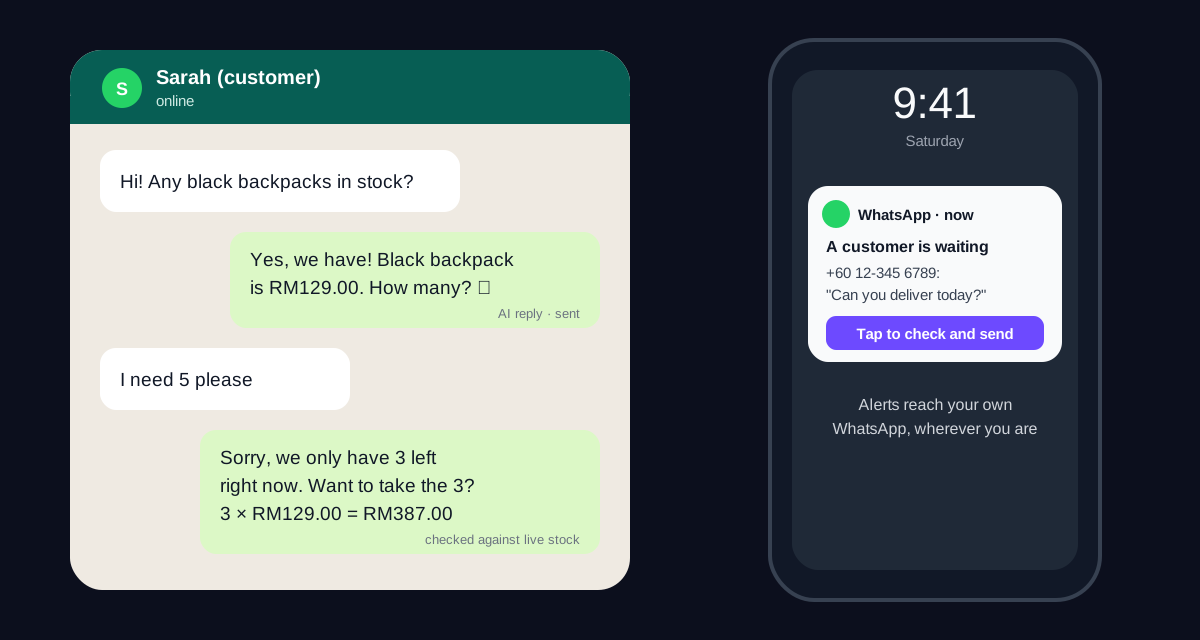
In FiveBatch, customer replies are handled by Paolo, the customer-care specialist in your AI marketing team. Paolo reads the whole conversation, not just the last line, so a vague follow-up like "price on each?" gets a proper answer about the items you were just discussing.
He answers only from what you have taught the team: your website and products, exact prices, business notes such as delivery areas, fees and opening hours, and, if you link your inventory, live stock. If the answer is not there, he says you will check and flags the chat for you. Inventing a price or a policy is the fastest way for an AI to lose a customer's trust, so it is not allowed.
Just as important is what Paolo does not do. When a customer says "I'll take it" or asks you to arrange delivery, he confirms the total, says you will reach out to arrange payment and delivery, and passes the chat to you. He never asks for card numbers or home addresses, and he never pretends to create an invoice he cannot create.
Off, Draft for approval or Auto-reply: which mode should you choose?
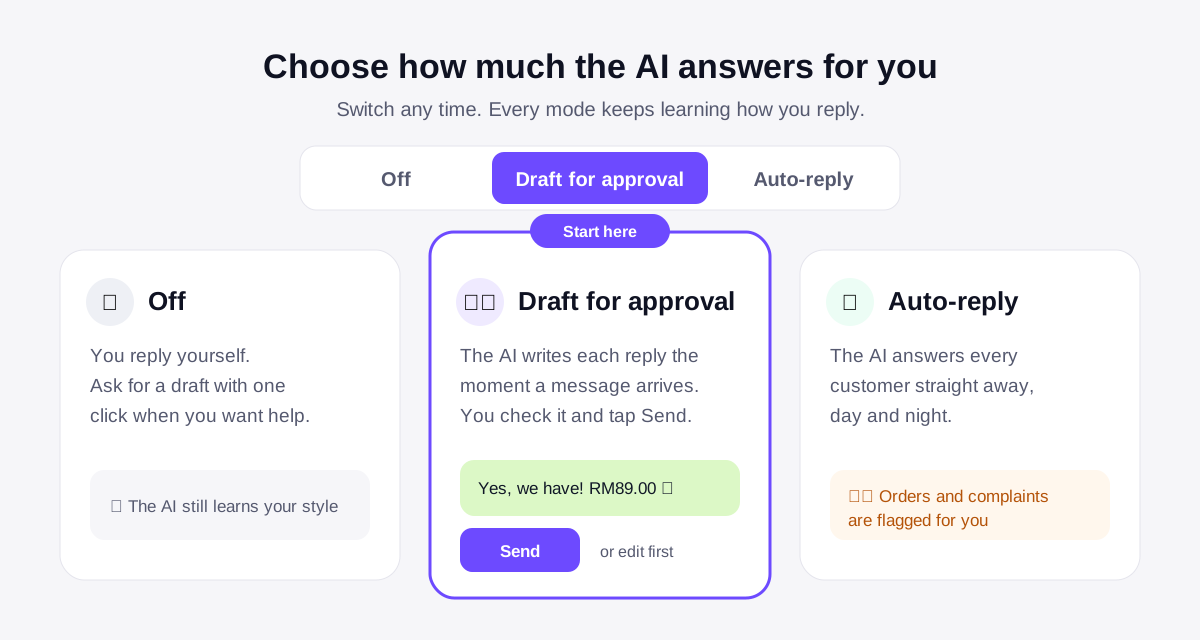
One switch at the top of the FiveBatch Inbox decides who answers your customers. Off means you reply yourself and click Draft reply only when you want help. Draft for approval means Paolo writes a reply the moment a message or comment arrives, and it waits in Ready to send until you check it and tap Send. Auto-reply means Paolo answers every customer straight away, day and night, and flags orders, bookings and complaints for your follow-up.
For almost everyone, the right place to start is Draft for approval. You see exactly what Paolo would say, you fix anything that is not quite right, and every change you make teaches him your style. New FiveBatch accounts are guided to start here for that reason.
Switch to Auto-reply once most drafts are going out without any changes. That is the signal that Paolo knows your products, your tone and your customers well enough to answer without you. Keep your prices and stock up to date, because in Auto-reply customers see the answer straight away. You can switch back to drafts at any time.
WhatsApp, Instagram DMs, comments and DM campaigns in one inbox
The Inbox brings every customer conversation into one place, in four tabs. Messages holds Instagram direct messages and Facebook Messenger chats. Comments holds public comments on your posts, where Paolo keeps replies short and public-friendly and invites people to message you for personal orders.
DM Campaigns turn comments into conversations. Ask people to comment a keyword like PRICE or LINK on a post, and everyone who does gets a private message with the details instantly, plus a public "check your DMs" reply. Paolo writes the campaign once and it runs around the clock, which is especially useful when a post takes off and hundreds of comments arrive in an hour.
The WhatsApp tab connects one or more WhatsApp Business numbers. Customer chats appear with their photos and voice notes, and Paolo replies according to your mode. To start a brand-new conversation, WhatsApp requires a message template approved by Meta; once the customer replies, you can chat normally for the next 24 hours. If you would rather not connect anything, you can paste a customer's message and open WhatsApp with Paolo's reply ready to send.
Never miss a waiting customer: WhatsApp alerts to your phone
An AI that writes perfect drafts is useless if nobody sees them. With WhatsApp alerts to my phone turned on, your business number sends a short WhatsApp to your personal phone whenever a reply is waiting for your OK or a chat needs your follow-up, with a one-tap link to check and send.
You can get email alerts as well, but most owners find WhatsApp faster because it is already the app they check most. Each alert costs a small Meta fee of about one US cent. Your own alert number is never answered by the AI, so alerts can never loop back into an AI conversation with yourself.
Teaching the AI to sound like you
The fastest way to lose a customer is a reply that obviously came from a bot: "Thank you for reaching out! We appreciate your inquiry." Paolo is built to avoid that. He studies your own replies, from FiveBatch and from the WhatsApp Business app, and copies your greetings, emoji habits, slang and language mix, whether that is formal English, Malay, relaxed Manglish, Spanish or Arabic. He always replies in the language the customer wrote in, even if your catalog is only in English.
Every draft you edit before sending becomes a new example of how you like to reply. When your answer contains something new, such as a delivery fee or a pack size, Paolo suggests saving it as a business fact, and it only becomes part of his knowledge once you approve it. Over a couple of weeks, the drafts start sounding like you wrote them.
He also learns when not to talk. A customer's plain "ok", "thanks" or thumbs-up simply closes the chat, so Paolo stays quiet instead of sending yet another "Let me know if you need anything!". And if a customer asks for 10 of something when only 3 are left, he says so honestly and offers the 3, instead of promising stock you do not have. The same care goes into knowing your brand across everything the team writes.
From conversation to customer: the built-in CRM
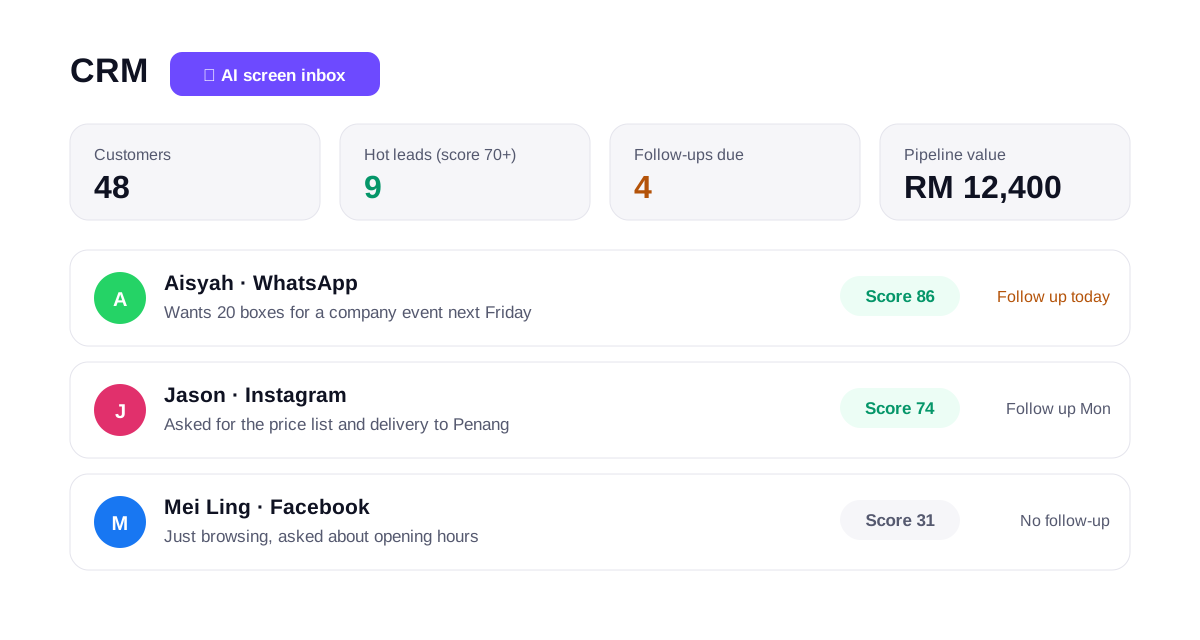
Answering fast is half the job; following up is the other half. The FiveBatch CRM turns conversations into a customer pipeline. Click AI screen inbox and Paolo reads your recent chats, picks out the people worth following up and gives each a score, so hot leads with a score of 70 or more rise to the top.
Each customer has a follow-up date and a deal value, so the dashboard shows who to contact today and how much business is in play. You can reply from the CRM with the same AI drafts on WhatsApp, Instagram or Facebook, add customers by hand, or click Add to CRM from any chat in the Inbox.
A simple two-week rollout plan
Day 1: teach the team. Add your website, products and prices, and write a few business notes covering delivery, payment, opening hours and anything customers ask often. Connect Instagram, Facebook and your WhatsApp Business number, then turn on WhatsApp alerts to your phone.
Days 2 to 10: run Draft for approval. Check each draft, fix the wording when it is not how you would say it, and approve the business facts Paolo suggests. Pay attention to how often you send a draft unchanged.
Day 10 onwards: when most drafts go out untouched, switch to Auto-reply and use the CRM each morning to follow up hot leads and finish the orders Paolo handed back. Want to grow the top of the funnel too? Pair it with a weekly blog from SEO Autopilot and scheduled social posts, then compare plans and credits. Each reply Paolo writes uses one credit, and spam or messages that need no reply cost nothing.
Frequently asked questions
Can AI reply to WhatsApp messages automatically?
Yes. Once your WhatsApp Business number is connected to FiveBatch, Paolo can draft every reply for your approval or answer automatically. New conversations that you start yourself need a Meta-approved template; replies within 24 hours of the customer's last message do not.
Will customers know they are talking to an AI?
Paolo writes in your own style, learned from your real replies, so answers read naturally. Many owners still start with Draft for approval so they can check every reply before it is sent.
What if the AI does not know the answer?
It says you will check and flags the chat for you, instead of guessing. Once you answer, Paolo can suggest saving that answer as a business fact for next time.
How much does AI auto-reply cost in FiveBatch?
Each reply Paolo writes uses 1 credit, whether it is sent automatically or waits for approval. Spam and simple "ok" or "thanks" messages cost nothing. You start with 30 free credits.
Ready to put this into practice?
Start free and see what FiveBatch AI does for your brand in the first 7 days.
Start free — no credit card